ChronoDown • 2026
Building a Native macOS Timekeeping App in 72 Hours Under Real Pressure
ROLE
macOS Software Engineer
TIMELINE
May 2026
Team
Solo Developer
SKILLS
Swift & SwiftUI
SwiftData
AppKit
Overview
Building a Native macOS Timekeeping App in 72 Hours Under Real Pressure
"The best tools are born from real frustration. I didn't build ChronoDown because I wanted a side project, I built it because I was drowning in split screens and sticky notes during a live event."
I served as the official timekeeper for my university department's orientation event (ospek jurusan) a multi-day onboarding program for new students. As part of the Event Division in my campus organization, my job was to keep every session on schedule: track countdowns, manage overtime, log deviations, and ensure speakers wrapped up on time.
Four days. Dozens of sessions. Hundreds of new students waiting. And the entire schedule depended on one person keeping perfect time.
The Problem
Day 1: Technical Meeting
On Day 1, the Technical Meeting, I showed up with the tools available to me:
macOS native Timer app: or counting down each session
Apple Notes: for manually writing down remaining time, overtime notes, and time adjustments
Google Sheets: for the event rundown (session names, speakers, planned durations)
Split-screen layout: Timer on one side, rundown on the other, switching between Notes constantly

Within the first hour, the cracks appeared:

By the end of Day 1, I realized something: the tooling wasn't just inconvenient, it was actively working against me. Every minute I spent juggling apps was a minute I wasn't fully focused on the event. The friction was compounding.
The insight: The problem wasn't that macOS lacked a timer. It had one. The problem was that timekeeping for live events is not just counting down it's an interconnected system of schedule tracking, time redistribution, pace awareness, and real-time estimation. No single existing tool addressed this workflow.
The Solution
Day 1 Night: Building the MVP
That same night after the Technical Meeting, I made a decision: I'm going to build exactly what I needed today.
Not a generic timer. Not a clone of an existing app. A purpose-built native macOS timekeeping application designed specifically for live event management with every feature informed by the real pain I'd just experienced.
I named it ChronoDown (Chrono = time, Down = countdown).
What I Built for Day 2 (MVP)
The initial MVP focused on eliminating the most critical friction points:
Session-based countdown timer: Load a rundown of sessions, each with a title, speaker, and planned duration. Select a session, hit play, and it counts down.
Automatic overtime tracking: When a countdown hits zero, the timer seamlessly transitions to counting up in overtime mode, displayed in red. No manual stopwatch needed.
Time Bank system: The killer feature. When a session finishes early, the remaining time is automatically "banked." When a session runs overtime, the deficit is deducted from the bank. At any point, I could see: "Are we ahead or behind schedule?" in a single glance.
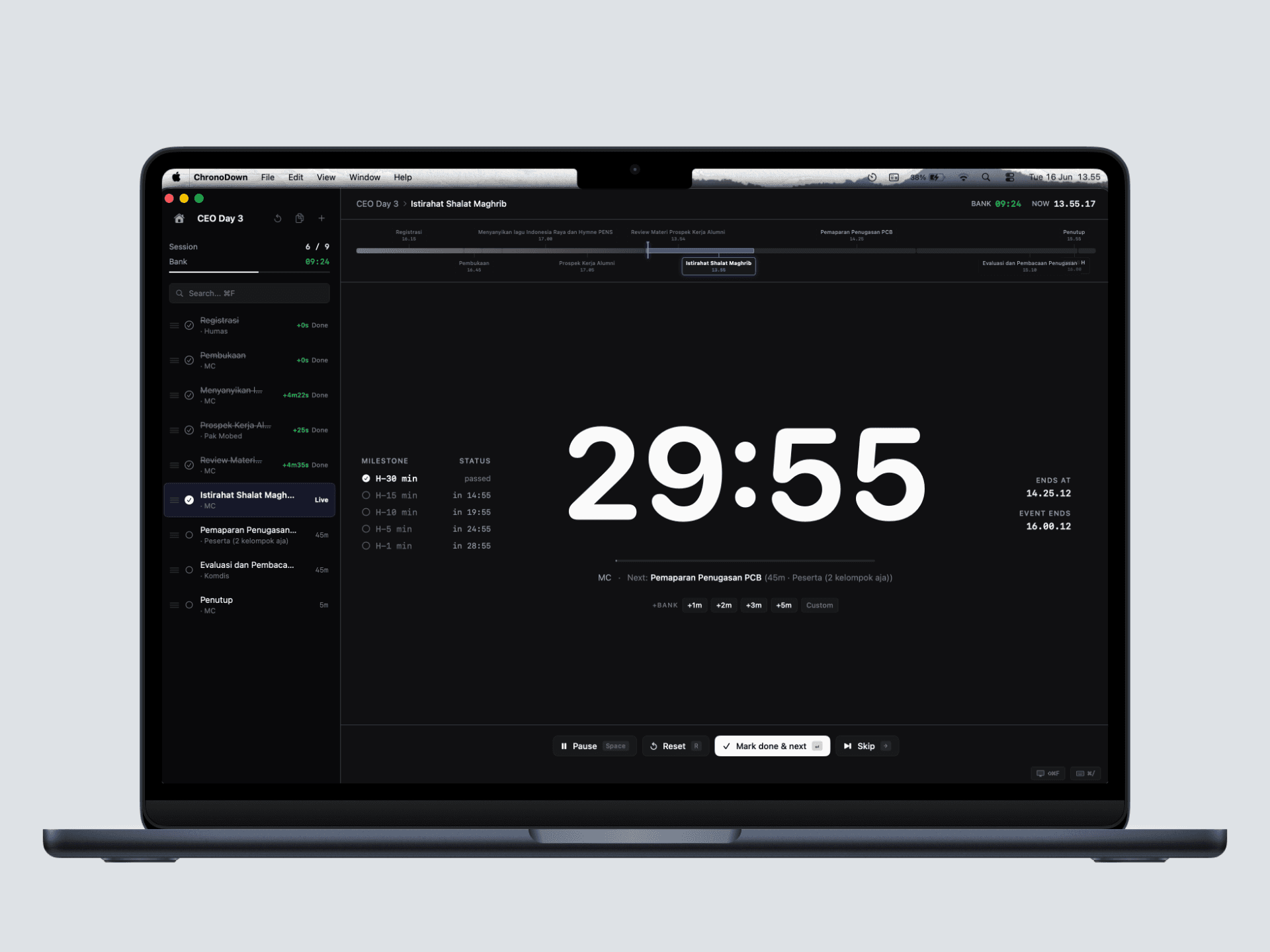
Session list with status indicators: Pending, Active, Completed, Skipped each visually distinct so I could see the entire event's state at a glance.
Basic keyboard controls: Space to play/pause, Return to mark done and auto-advance to the next session.
Day 2: First Real-World Test
I deployed the MVP on Day 2 of the orientation event. For the first time, I wasn't fighting my tools:
Sessions loaded from a list instead of cross-referencing a spreadsheet
Time banked automatically instead of mental math with scribbled notes
Overtime tracked seamlessly instead of fumbling with a second stopwatch
One app, one window, one focus
It worked. But it wasn't perfect.


The Iteration
Day 2 → Day 3: Bug Fixes and Feature Evolution
After Day 2, I logged several issues and improvement ideas. I couldn't attend the event on Day 3, which gave me a full, uninterrupted day to fix every bug, refactor the timer engine, and build out the complete feature set. What started as a quick MVP became a comprehensive application all in a single focused day of development.
Critical Bugs Fixed
he most critical bug was in the timer engine logic itself the core countdown mechanism. The original implementation had timing drift issues:
Problem: Timer was using setInterval-style incremental subtraction (timeRemaining -= 0.1 every 100ms), which accumulated floating-point errors over long sessions. A 30-minute session could drift by several seconds.
Solution: Switched to a target-end-time architecture. On start, calculate targetEndTime = Date() + timeRemaining. On each tick, compute remaining = targetEndTime - Date(). Immune to drift because it always references the system clock.
This architectural fix using Date-based absolute time rather than relative decrements is the same approach used in professional broadcast timers. It's a small change in code but a fundamental change in reliability.
The Final Product
Completed on Day 3, Deployed on Day 4
By the end of Day 3, ChronoDown had evolved from a simple countdown timer into a comprehensive, production-grade timekeeping system. On Day 4, I walked into the event with a fully polished, battle-tested native macOS application and used it to run the entire day's schedule seamlessly. Here's what it became:

Architecture Overview
Complete Feature Breakdown
Core Timer Engine
Drift-free countdown: using
Date-based target end time architecture no accumulated floating-point errors over long sessionsSeamless overtime transition: timer counts up the moment it hits zero, with visual state change (red text, pulsing background)
Pause All / Resume All: freeze the entire schedule (e.g., during an emergency break) with exact state preservation
Auto-advance: automatically starts the next pending session after marking one complete
System sleep prevention: uses
ProcessInfo.beginActivity()to prevent macOS from sleeping mid-session

Time Bank System
Automatic banking: surplus time from early finishes is banked; overtime deficits are deducted
One-click injection: inject +1m, +2m, +3m, +5m from banked time into the active session with a single click
Custom injection: inject any amount in 30-second increments via a dedicated popover
Real-time balance display: green when ahead of schedule, red when behind, with animated numeric transitions
Per-project isolation: each project maintains its own independent time bank

Session Management
Rich session model: title, planned duration, speaker name, notes (500-char limit), scheduled start time, actual duration, time deviation
Four statuses: Pending → Active → Completed / Skipped, with visual indicators for each
Drag-to-reorder: reorder sessions mid-event with live estimated end time recalculation during drag
Inline insert: hover between sessions to insert a new one without opening a modal
Smart duration suggestions: new sessions auto-suggest duration based on keyword matching ("break" → 15m, "lunch" → 60m, "keynote" → 45m) or average of existing sessions
Session splitting: split a running session into two parts (e.g., a speaker needs more time, so you split the remaining into a continuation)
Context menu actions: right-click to edit, delete, reset to pending, or restart from a specific session

Schedule Intelligence
Estimated session end time: "This session ends at 14:37"
Estimated event end time: "The event ends at 17:15" dynamically recalculated every second based on current pace
Pace indicator: "Ahead by 4:30" or "Behind by 2:15" derived from Time Bank balance
Confidence range: after 3+ completed sessions, shows best-case and worst-case finish time estimates based on historical deviation patterns
Session deviation heatmap: completed sessions are color-coded (green = finished early, red = ran overtime) with intensity based on severity
Milestone markers: H-30, H-15, H-10, H-5, H-1 minute checkpoints with real-time "in X:XX" or "passed" status

Multi-Window Architecture
Main Dashboard: sidebar with session list + main timer display + controls. This is the timekeeper's command center
Focus Mode (Presenter Display): a separate, fullscreen window designed for external monitors/projectors. Shows a massive countdown readable from across the room, with dynamic background color that shifts based on session health:
Green glow → LIVE, on track
Amber glow → 5-minute warning or paused
Red pulse → overtime, pulsing urgency
Up Next session preview, real-world clock, progress bar, elapsed vs. planned display
Menu Bar Extra: persistent macOS menu bar widget showing the active session and timer, accessible from anywhere without switching apps. Includes "Open Dashboard" quick action

Keyboard-First UX
Every action is accessible without a mouse, critical for a timekeeper who can't afford to fumble:
The Impact
Measurable Results

What I Learned
The development of ChronoDown was driven by a powerful shift from consumer to creator, treating my own frustrations at the sound desk as a live user research session. Under the intense pressure of needing a working tool by the next morning, I learned that a true MVP means minimal scope, not minimal quality. By focusing on just a few bulletproof, keyboard-first features, I eliminated the cognitive load of fumbling with a trackpad during live shows. Building the app at night and using it on stage the next day created a relentless 12-hour feedback loop, allowing me to transform an everyday inefficiency into a fully deployed solution in just four days.
Under the hood, this rapid iteration relied on precise architectural choices. The most critical breakthrough was adopting a broadcast-grade, date-based timing system that completely eliminated timer drift. To keep pace with the overnight deadline, I leveraged SwiftData for instant data persistence and Swift's @Observable macro for seamless, automatic UI updates across three independent macOS windows. Anchored by a shared TimerEngine as the single source of truth and fortified by a strictly type-safe undo system, the app's architecture guaranteed rock-solid reliability when it mattered most.
Ultimately, ChronoDown was more than just a software project; it was a profound lesson in identifying inefficiency as an engineering problem and having the courage to build the exact tool the moment required.
Technical Highlights Worth Noting
The Time Bank Algorithm
On session finish:
  if (actual < planned) → bank += (planned - actual)    // Finished early: save surplus
  if (actual > planned) → bank -= (actual - planned)    // Ran overtime: deduct deficit

On time injection:
  bank -= injectedAmount
  activeSession.timeRemaining += injectedAmount

Result: bank > 0 means ahead of schedule
        bank < 0 means behind schedule
        bank == 0 means exactly on track
This single mechanism replaced all of my mental math, scribbled notes, and anxiety about "are we on time?"
Confidence Range Estimation
After 3+ completed sessions, ChronoDown calculates best-case and worst-case finish times:
bestCase  = standardEstimate - (avgTimeSaved × remainingSessionCount)
worstCase = standardEstimate + (avgOvertime × remainingSessionCount)
This gave me the ability to tell the committee: "Best case, we finish at 16:45. Worst case, 17:20." — real answers backed by data, not guesses.
Adaptive Background Intelligence
The app's background subtly shifts color based on schedule health, a form of ambient information display:
Cool blue-black → ahead of schedule (positive Time Bank)
Neutral pure black → exactly on track
Warm red-black → behind schedule (negative Time Bank)
The shift is so subtle you might not consciously notice it, but it creates an underlying sense of urgency or calm that helps me stay calibrated without checking numbers.
Final
The Journey in One Sentence
I identified a real-world workflow problem during a live event, built a purpose-specific native macOS application overnight, tested it in production the next day, used my day off to rebuild it into a full-featured system, and deployed the finished product on Day 4, problem to polished app in 3 days of development.
ChronoDown • 2026
Building a Native macOS Timekeeping App in 72 Hours Under Real Pressure
ROLE
macOS Software Engineer
TIMELINE
May 2026
Team
Solo Developer
SKILLS
Swift & SwiftUI
SwiftData
AppKit
Overview
Building a Native macOS Timekeeping App in 72 Hours Under Real Pressure
"The best tools are born from real frustration. I didn't build ChronoDown because I wanted a side project, I built it because I was drowning in split screens and sticky notes during a live event."
I served as the official timekeeper for my university department's orientation event (ospek jurusan) a multi-day onboarding program for new students. As part of the Event Division in my campus organization, my job was to keep every session on schedule: track countdowns, manage overtime, log deviations, and ensure speakers wrapped up on time.
Four days. Dozens of sessions. Hundreds of new students waiting. And the entire schedule depended on one person keeping perfect time.
The Problem
Day 1: Technical Meeting
On Day 1, the Technical Meeting, I showed up with the tools available to me:
macOS native Timer app: or counting down each session
Apple Notes: for manually writing down remaining time, overtime notes, and time adjustments
Google Sheets: for the event rundown (session names, speakers, planned durations)
Split-screen layout: Timer on one side, rundown on the other, switching between Notes constantly
Within the first hour, the cracks appeared:
By the end of Day 1, I realized something: the tooling wasn't just inconvenient, it was actively working against me. Every minute I spent juggling apps was a minute I wasn't fully focused on the event. The friction was compounding.
The insight: The problem wasn't that macOS lacked a timer. It had one. The problem was that timekeeping for live events is not just counting down it's an interconnected system of schedule tracking, time redistribution, pace awareness, and real-time estimation. No single existing tool addressed this workflow.
The Solution
Day 1 Night: Building the MVP
That same night after the Technical Meeting, I made a decision: I'm going to build exactly what I needed today.
Not a generic timer. Not a clone of an existing app. A purpose-built native macOS timekeeping application designed specifically for live event management with every feature informed by the real pain I'd just experienced.
I named it ChronoDown (Chrono = time, Down = countdown).
What I Built for Day 2 (MVP)
The initial MVP focused on eliminating the most critical friction points:
Session-based countdown timer: Load a rundown of sessions, each with a title, speaker, and planned duration. Select a session, hit play, and it counts down.
Automatic overtime tracking: When a countdown hits zero, the timer seamlessly transitions to counting up in overtime mode, displayed in red. No manual stopwatch needed.
Time Bank system: The killer feature. When a session finishes early, the remaining time is automatically "banked." When a session runs overtime, the deficit is deducted from the bank. At any point, I could see: "Are we ahead or behind schedule?" in a single glance.
Session list with status indicators: Pending, Active, Completed, Skipped each visually distinct so I could see the entire event's state at a glance.
Basic keyboard controls: Space to play/pause, Return to mark done and auto-advance to the next session.
Day 2: First Real-World Test
I deployed the MVP on Day 2 of the orientation event. For the first time, I wasn't fighting my tools:
Sessions loaded from a list instead of cross-referencing a spreadsheet
Time banked automatically instead of mental math with scribbled notes
Overtime tracked seamlessly instead of fumbling with a second stopwatch
One app, one window, one focus
It worked. But it wasn't perfect.
The Iteration
Day 2 → Day 3: Bug Fixes and Feature Evolution
After Day 2, I logged several issues and improvement ideas. I couldn't attend the event on Day 3, which gave me a full, uninterrupted day to fix every bug, refactor the timer engine, and build out the complete feature set. What started as a quick MVP became a comprehensive application all in a single focused day of development.
Critical Bugs Fixed
he most critical bug was in the timer engine logic itself the core countdown mechanism. The original implementation had timing drift issues:
Problem: Timer was using setInterval-style incremental subtraction (timeRemaining -= 0.1 every 100ms), which accumulated floating-point errors over long sessions. A 30-minute session could drift by several seconds.
Solution: Switched to a target-end-time architecture. On start, calculate targetEndTime = Date() + timeRemaining. On each tick, compute remaining = targetEndTime - Date(). Immune to drift because it always references the system clock.
This architectural fix using Date-based absolute time rather than relative decrements is the same approach used in professional broadcast timers. It's a small change in code but a fundamental change in reliability.
The Final Product
Completed on Day 3, Deployed on Day 4
By the end of Day 3, ChronoDown had evolved from a simple countdown timer into a comprehensive, production-grade timekeeping system. On Day 4, I walked into the event with a fully polished, battle-tested native macOS application and used it to run the entire day's schedule seamlessly. Here's what it became:
Architecture Overview
Complete Feature Breakdown
Core Timer Engine
Drift-free countdown: using
Date-based target end time architecture no accumulated floating-point errors over long sessionsSeamless overtime transition: timer counts up the moment it hits zero, with visual state change (red text, pulsing background)
Pause All / Resume All: freeze the entire schedule (e.g., during an emergency break) with exact state preservation
Auto-advance: automatically starts the next pending session after marking one complete
System sleep prevention: uses
ProcessInfo.beginActivity()to prevent macOS from sleeping mid-session
Time Bank System
Automatic banking: surplus time from early finishes is banked; overtime deficits are deducted
One-click injection: inject +1m, +2m, +3m, +5m from banked time into the active session with a single click
Custom injection: inject any amount in 30-second increments via a dedicated popover
Real-time balance display: green when ahead of schedule, red when behind, with animated numeric transitions
Per-project isolation: each project maintains its own independent time bank
Session Management
Rich session model: title, planned duration, speaker name, notes (500-char limit), scheduled start time, actual duration, time deviation
Four statuses: Pending → Active → Completed / Skipped, with visual indicators for each
Drag-to-reorder: reorder sessions mid-event with live estimated end time recalculation during drag
Inline insert: hover between sessions to insert a new one without opening a modal
Smart duration suggestions: new sessions auto-suggest duration based on keyword matching ("break" → 15m, "lunch" → 60m, "keynote" → 45m) or average of existing sessions
Session splitting: split a running session into two parts (e.g., a speaker needs more time, so you split the remaining into a continuation)
Context menu actions: right-click to edit, delete, reset to pending, or restart from a specific session
Schedule Intelligence
Estimated session end time: "This session ends at 14:37"
Estimated event end time: "The event ends at 17:15" dynamically recalculated every second based on current pace
Pace indicator: "Ahead by 4:30" or "Behind by 2:15" derived from Time Bank balance
Confidence range: after 3+ completed sessions, shows best-case and worst-case finish time estimates based on historical deviation patterns
Session deviation heatmap: completed sessions are color-coded (green = finished early, red = ran overtime) with intensity based on severity
Milestone markers: H-30, H-15, H-10, H-5, H-1 minute checkpoints with real-time "in X:XX" or "passed" status
Multi-Window Architecture
Main Dashboard: sidebar with session list + main timer display + controls. This is the timekeeper's command center
Focus Mode (Presenter Display): a separate, fullscreen window designed for external monitors/projectors. Shows a massive countdown readable from across the room, with dynamic background color that shifts based on session health:
Green glow → LIVE, on track
Amber glow → 5-minute warning or paused
Red pulse → overtime, pulsing urgency
Up Next session preview, real-world clock, progress bar, elapsed vs. planned display
Menu Bar Extra: persistent macOS menu bar widget showing the active session and timer, accessible from anywhere without switching apps. Includes "Open Dashboard" quick action
Keyboard-First UX
Every action is accessible without a mouse, critical for a timekeeper who can't afford to fumble:
The Impact
Measurable Results
What I Learned
The development of ChronoDown was driven by a powerful shift from consumer to creator, treating my own frustrations at the sound desk as a live user research session. Under the intense pressure of needing a working tool by the next morning, I learned that a true MVP means minimal scope, not minimal quality. By focusing on just a few bulletproof, keyboard-first features, I eliminated the cognitive load of fumbling with a trackpad during live shows. Building the app at night and using it on stage the next day created a relentless 12-hour feedback loop, allowing me to transform an everyday inefficiency into a fully deployed solution in just four days.
Under the hood, this rapid iteration relied on precise architectural choices. The most critical breakthrough was adopting a broadcast-grade, date-based timing system that completely eliminated timer drift. To keep pace with the overnight deadline, I leveraged SwiftData for instant data persistence and Swift's @Observable macro for seamless, automatic UI updates across three independent macOS windows. Anchored by a shared TimerEngine as the single source of truth and fortified by a strictly type-safe undo system, the app's architecture guaranteed rock-solid reliability when it mattered most.
Ultimately, ChronoDown was more than just a software project; it was a profound lesson in identifying inefficiency as an engineering problem and having the courage to build the exact tool the moment required.
Technical Highlights Worth Noting
The Time Bank Algorithm
On session finish:
  if (actual < planned) → bank += (planned - actual)    // Finished early: save surplus
  if (actual > planned) → bank -= (actual - planned)    // Ran overtime: deduct deficit

On time injection:
  bank -= injectedAmount
  activeSession.timeRemaining += injectedAmount

Result: bank > 0 means ahead of schedule
        bank < 0 means behind schedule
        bank == 0 means exactly on track
This single mechanism replaced all of my mental math, scribbled notes, and anxiety about "are we on time?"
Confidence Range Estimation
After 3+ completed sessions, ChronoDown calculates best-case and worst-case finish times:
bestCase  = standardEstimate - (avgTimeSaved × remainingSessionCount)
worstCase = standardEstimate + (avgOvertime × remainingSessionCount)
This gave me the ability to tell the committee: "Best case, we finish at 16:45. Worst case, 17:20." — real answers backed by data, not guesses.
Adaptive Background Intelligence
The app's background subtly shifts color based on schedule health, a form of ambient information display:
Cool blue-black → ahead of schedule (positive Time Bank)
Neutral pure black → exactly on track
Warm red-black → behind schedule (negative Time Bank)